
One Excel Add-In, Six ERPs: How Calculom Unifies Financial Reporting Across Your Entire Stack
Calculom now connects Excel and Google Sheets to Odoo, Acumatica, QuickBooks, Sage Intacct, Xero, and NetSuite. One platform for multi-ERP financial reporting.
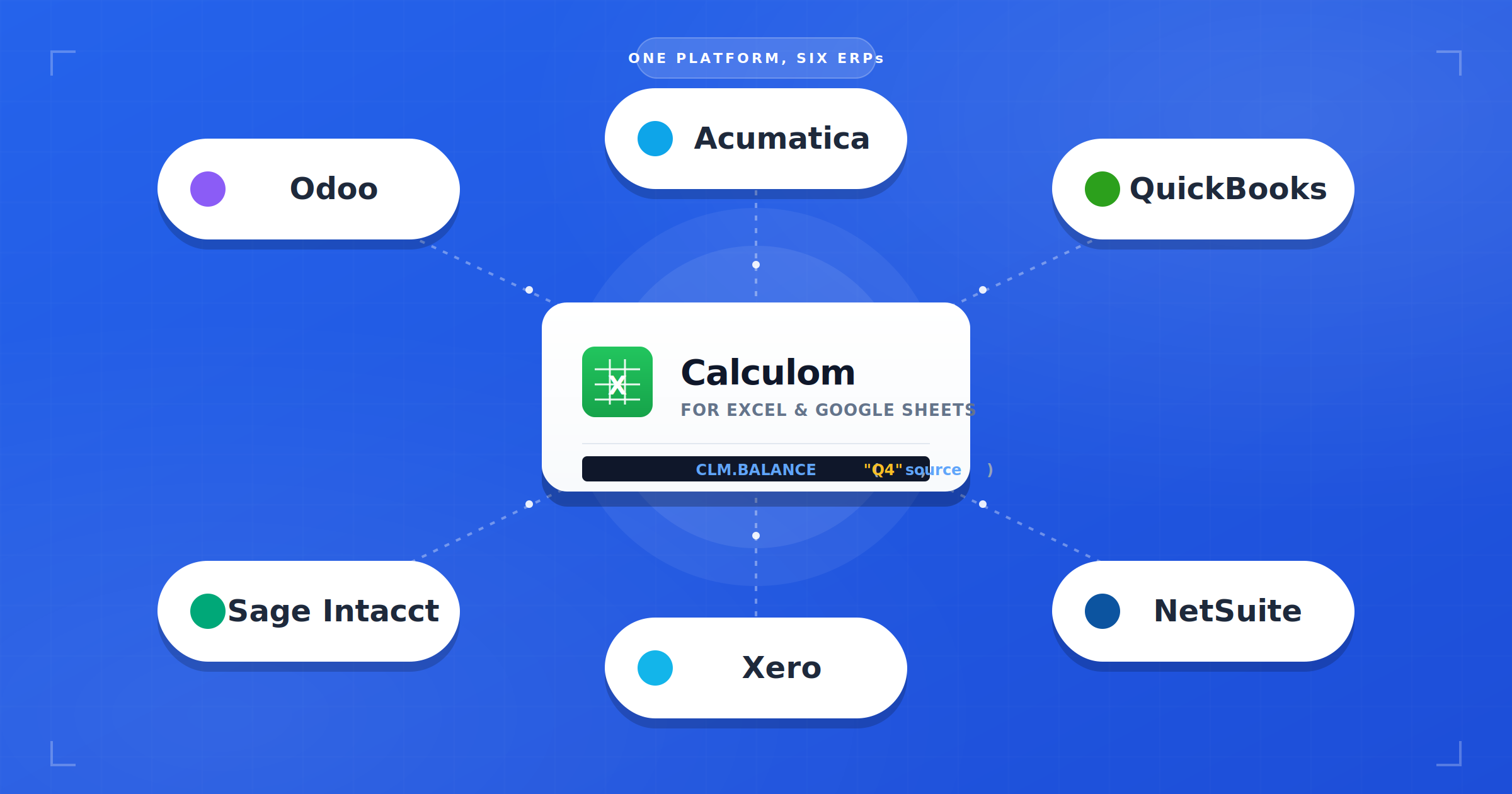
If you manage financial reporting for a modern business, you probably don't work with just one ERP. You work with the one you've had since day one, plus the one you inherited in an acquisition, plus the one a subsidiary uses, plus the one you're halfway migrated to. And alongside all of that, you've got a CRM, a billing system, a payroll platform, and probably a data warehouse.
Until now, the Excel add-in for ERP reporting market treated each ERP as its own island. One tool for QuickBooks, a different one for NetSuite, yet another for Xero. That approach no longer matches how finance teams actually operate.
Today, we're announcing a fundamental expansion of the Calculom platform: native support for six of the most widely used ERPs in the world, plus custom connections to almost any other data source your reporting requires, all from the same Excel interface you and your team already know.
Why "One ERP" Isn't the Reality Anymore
There's a quiet assumption baked into most financial reporting tools: that your company runs on a single ERP. Pick your platform, install the connector, and you're done.
It's a clean story. It's also increasingly disconnected from how mid-market and growing enterprise finance teams actually operate. Industry research puts the global ERP market at roughly $73 billion in 2025, with over 1.4 million companies running ERP systems worldwide, and a growing share of those companies run more than one.
If your company has grown through acquisition, changed ERPs in the last five years, or operates multiple subsidiaries, you probably don't have "one ERP." You have two, three, or more systems running side by side.
Here's what we hear from finance leaders every week:
Acquisitions and M&A
Your company acquires another business. They're on QuickBooks. You're on NetSuite. Integrating the ERPs is a multi-year project that rarely completes on the original timeline, and sometimes never completes at all. Research on post-merger ERP integration consistently identifies technology compatibility as one of the top challenges CEOs cite when executing M&A deals. In the meantime, you need to produce consolidated financials every single month.
Subsidiaries and Entities
The parent runs on Sage Intacct. The US operating entity is on QuickBooks. The European subsidiary is on Xero because of local compliance needs. The recently launched Asian entity is on NetSuite. Every entity has its own system, and every month, someone has to pull them all together.
ERP Migrations
You're moving from Xero to Sage Intacct. The migration will take twelve to eighteen months. For most of that time, both systems are producing real financial data that matters. You can't tell the board "sorry, we don't have accurate numbers this quarter because we're migrating."
Consulting and Fractional Finance
If you're a fractional CFO, outsourced controller, or advisory firm, your clients don't standardize on your preferred ERP. You serve one on QuickBooks, one on NetSuite, one on Odoo, and a fourth on Sage Intacct. Every new client means another learning curve.
Hybrid Operational and Accounting Stacks
Some companies run one ERP for operations (manufacturing, distribution, inventory) and a different system for accounting and consolidation. Reporting has to span both.
In none of these scenarios does "pick one ERP connector" solve the problem. In every one of them, finance teams are left stitching together reports from multiple sources, usually in Excel, usually manually, and always painfully.
The Hidden Cost of ERP-Specific Reporting Tools
When you have multiple ERPs, the typical response from the reporting tools market is to buy multiple tools. That path has a real cost, and most of it is invisible until you're already deep in it.
Problem 1: Tool Sprawl
Every ERP gets its own specialized reporting product. A dedicated tool for QuickBooks. A different one for NetSuite. Spreadsheet templates maintained by a consultant for the Xero subsidiary. Manual CSV exports from Sage Intacct because nothing is connected. Before long, your finance tech stack looks less like a stack and more like a pile.
Problem 2: Fragmented Skills
Each tool has its own interface, its own query language, its own quirks. Your senior FP&A analyst is the NetSuite expert. Your controller is the QuickBooks expert. Your consultant wrote the Xero templates and nobody else can maintain them. When someone leaves, or takes vacation during close week, you feel it immediately.
Problem 3: No Unified View
Board packages require stitching together data from three or four sources, every single month. Variance analysis across entities turns into a multi-day project. Consolidation becomes a manual reconciliation exercise that nobody trusts and everybody dreads.
Problem 4: Cost Multiplication
Multiple license fees. Multiple training investments. Multiple support contracts. Multiple vendor relationships to manage. The sticker price of any one tool looks reasonable. The combined cost of four of them is often shocking.
The real problem isn't the ERPs themselves. It's that reporting tools have historically treated each ERP as its own isolated island, forcing finance teams to maintain a bridge to every shore.

Tired of juggling reporting tools?
See how Calculom unifies financial reporting across every ERP you use.
What Finance Teams Actually Need
When we talk to CFOs, controllers, and FP&A leaders running multi-ERP environments, the wish list is remarkably consistent:
- One interface, regardless of the underlying ERP, so training, onboarding, and daily use work the same everywhere.
- Excel as the common language, because every finance professional already knows it, and no reporting tool has ever successfully replaced it.
- Consistent functions and formulas across ERPs, so a report built for one entity works the same way for another.
- Native consolidation that pulls live data from multiple ERPs directly into one report. No manual exports, no reconciliation headaches.
- One tool to learn, train on, and support, so institutional knowledge compounds instead of fragmenting.
- Portability across ERPs, so that if you migrate from Xero to Sage Intacct next year, your reporting doesn't have to start from scratch.
That's exactly what we built.
Introducing Multi-ERP Support in Calculom
Calculom started as an Excel add-in for Odoo reporting. Today, we're announcing support for five additional ERPs, bringing our total to six of the most widely used financial systems in the world.
This is the biggest expansion in the history of Calculom, and it fundamentally changes what the product is. We're no longer "the Odoo Excel tool." We're the Excel add-in for ERP reporting, full stop. Whichever ERP, or combination of ERPs, your business runs on.
The Calculom Approach
The design principle behind multi-ERP Calculom is that your finance team should never have to think about which ERP a piece of data came from. You open Excel. You use Calculom functions. The data flows. The ERP is a configuration detail, not a skill set.
- Same Excel interface, whether your data lives in QuickBooks or NetSuite or Odoo.
- Same
CLM.*function namespace. Learn it once, use it everywhere. - Same user experience for every member of your team.
- Different data sources on the back end, entirely invisible to the end user.
What This Unlocks
For existing Odoo customers, this expansion compounds the value of what you already have. If your business acquires a company on QuickBooks, you don't need to buy a new reporting tool. If you spin up a subsidiary on NetSuite, your existing team already has the skills to report on it.
For new customers coming in from other ERPs, you're getting a tool that's been battle-tested across thousands of reports in one of the most demanding ERP environments, and that's designed from day one to grow with you if your ERP stack ever changes.
The Six ERPs We Now Support
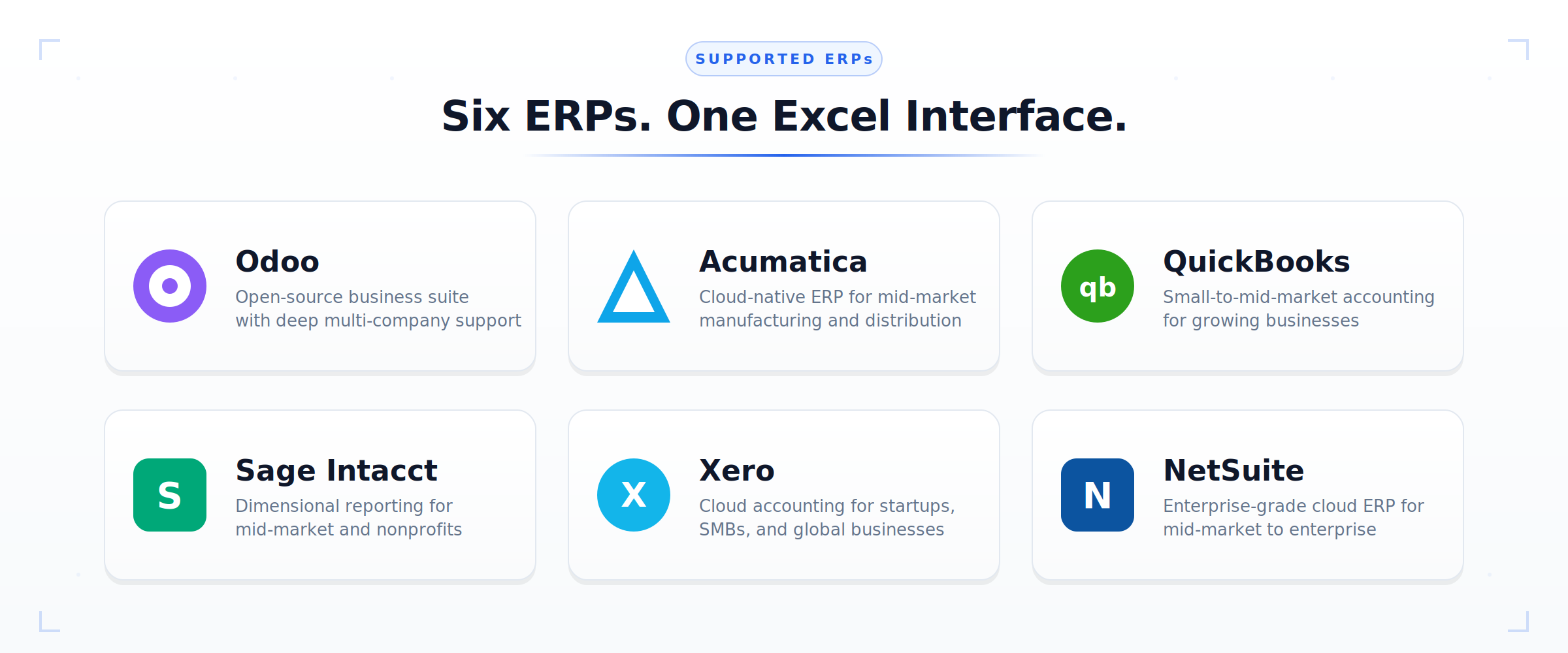
Here's a closer look at each of the six ERPs now supported by Calculom, along with who each integration is designed for.
Odoo
Our original ERP integration. Deep support for multi-company setups, full coverage of Odoo's financial modules, and the most mature feature set in the product.
For teams already on Odoo or evaluating it.
Acumatica
Cloud-native ERP popular in manufacturing, distribution, and project-based businesses. Full reporting integration directly from Excel, with support for Acumatica's dimensional structure.
For mid-market teams on Acumatica.
QuickBooks
The most widely used small-to-mid-market accounting system in the world. Full integration with QuickBooks Online, designed for growing businesses outgrowing native QuickBooks reporting.
For growing businesses that have pushed QuickBooks' native reporting to its limits.
Sage Intacct
Leading cloud accounting platform for mid-market businesses and nonprofits. Multi-entity support, dimensional reporting, and the kind of sophistication finance teams on Intacct need.
For teams needing dimensional, multi-entity financial reporting.
Xero
Popular with startups, SMBs, and international businesses. Excel-powered reporting without leaving the tools you already know and work in every day.
For teams on Xero who need more than native reports offer.
NetSuite
Enterprise-grade cloud ERP with the most complex chart of accounts in common use. Full support for NetSuite's custom segments, subsidiaries, and consolidation requirements.
For mid-market to enterprise teams running on NetSuite.
Not sure if we support a specific feature of your ERP? Reach out. We're continuously expanding coverage across all six platforms, and customer demand directly shapes our roadmap.
Ready to dig into the details?
Talk with our team about the right integration for your stack.
Beyond the Six ERPs: Custom Connections to Almost Anything
The six ERPs above cover the financial systems most of our customers run on. But finance teams rarely live inside the ERP alone. Your reporting needs often pull from systems the ERP doesn't know about: a CRM holding pipeline data, a payroll platform, a banking feed, an operational database, a data warehouse, a custom internal application.
That's why Calculom isn't limited to those six systems. We build custom connections to whatever data source your analysis requires.
What a Custom Connection Looks Like
If a system has an API, a database, or a structured export, we can usually connect to it and expose the data through the same Calculom function library you already use for ERP reporting. The end result is that your team opens Excel, writes the same kind of CLM.* formula they'd write for a NetSuite balance, and pulls data from Salesforce, Stripe, HubSpot, ADP, your bank, your data warehouse, or an internal system nobody outside your company has ever heard of.
A few examples of custom connections we've built or commonly discuss:
- CRM platforms (Salesforce, HubSpot, Pipedrive) for pipeline, revenue forecasting, and bookings analysis alongside GL data
- Payment and billing systems (Stripe, Chargebee, Recurly) for SaaS metrics and revenue recognition workflows
- Payroll and HR platforms (ADP, Gusto, Rippling) for headcount planning and compensation analysis
- Banking and treasury feeds for cash position reporting and reconciliation
- Data warehouses (Snowflake, BigQuery, Redshift) for analytics that already live in your modern data stack
- Internal or industry-specific systems that don't fit into any standard category
Why This Matters
The power of the platform approach isn't just connecting to six ERPs. It's that your board package, your variance analysis, and your monthly reporting can live in one Excel workbook that pulls from every system your business depends on, not just the accounting system.
A revenue report that ties GL data from NetSuite to pipeline data from Salesforce to billing data from Stripe. A headcount and compensation analysis that combines GL detail with ADP data. A treasury report that reconciles bank feeds against AR in QuickBooks. All of it in Excel, all of it refreshable, all of it using the same function library.
Most finance teams don't have a "reporting tool" problem. They have a "data is scattered across too many systems" problem. Calculom's job is to bring it all together in the one environment finance teams actually work in.
If you're working with a data source not listed above, that's not a blocker. Tell us what you need to connect to and we'll scope the work. Custom connections are a standard part of how we work with customers, not a rare exception.
How It Works: One Interface, Multiple Data Sources
The architecture behind multi-ERP Calculom is simpler than you might expect. There are three steps, and they work the same regardless of which ERPs you're using.
Step 1: Connect Your ERPs
Configure secure, authenticated connections to one or multiple ERPs through the Calculom control panel. The setup flow is the same regardless of system. No specialized consulting engagement, no custom integration project. Critically, no financial data is stored in Calculom. Data flows on demand from your ERPs directly into your spreadsheets.
Step 2: Use Calculom Functions in Excel
Open Excel and start writing formulas. The Calculom function library, including CLM.BALANCE(), CLM.TRANSACTIONS(), CLM.BUDGET(), and dozens of others, works identically whether you're pulling from Odoo, NetSuite, or any of the other four supported systems. Point a function at a different data source, and you get data from a different ERP. Nothing else changes.
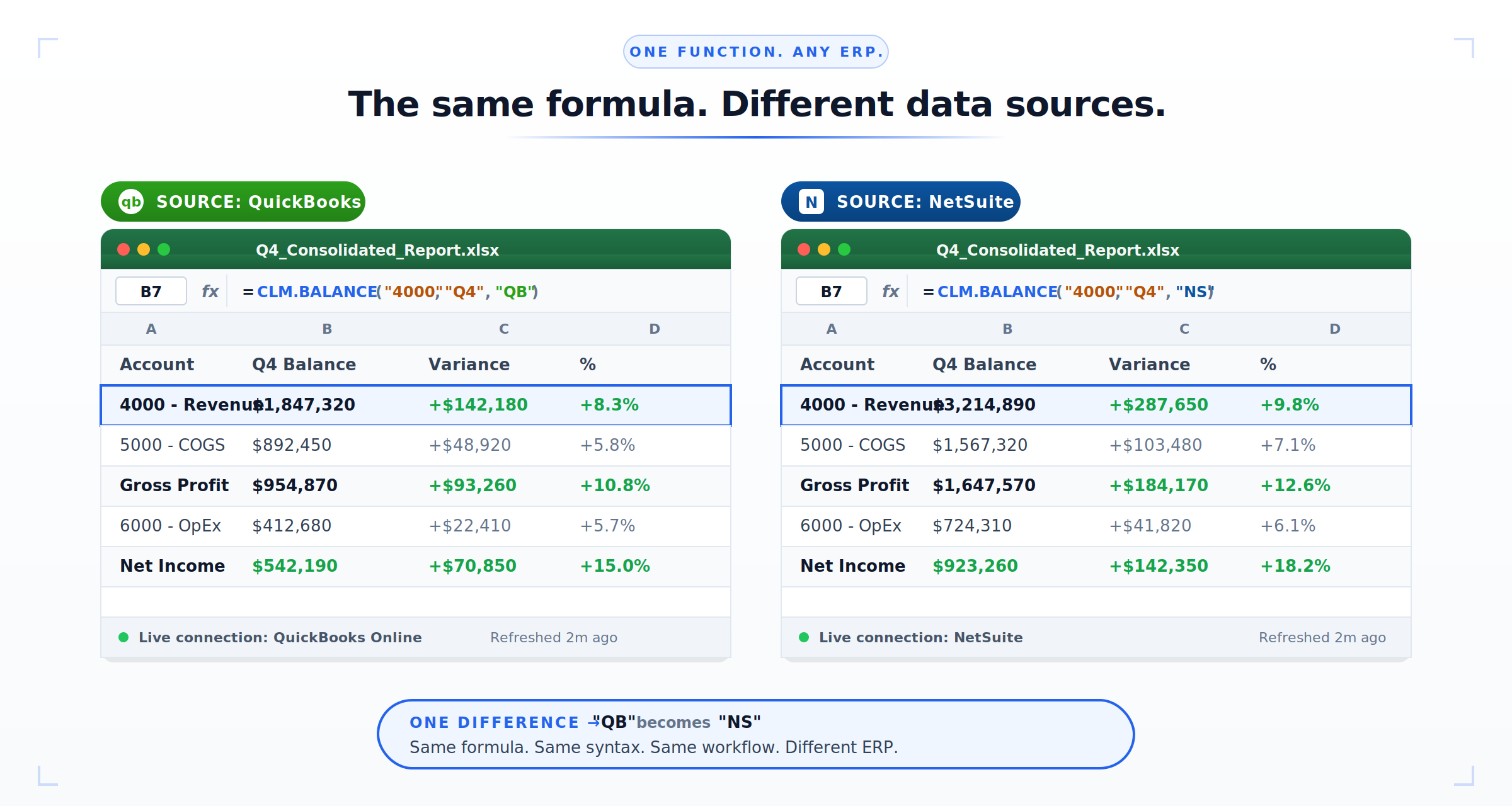
The function stays the same. The data source is a configuration detail.
Step 3: Build Unified Reports
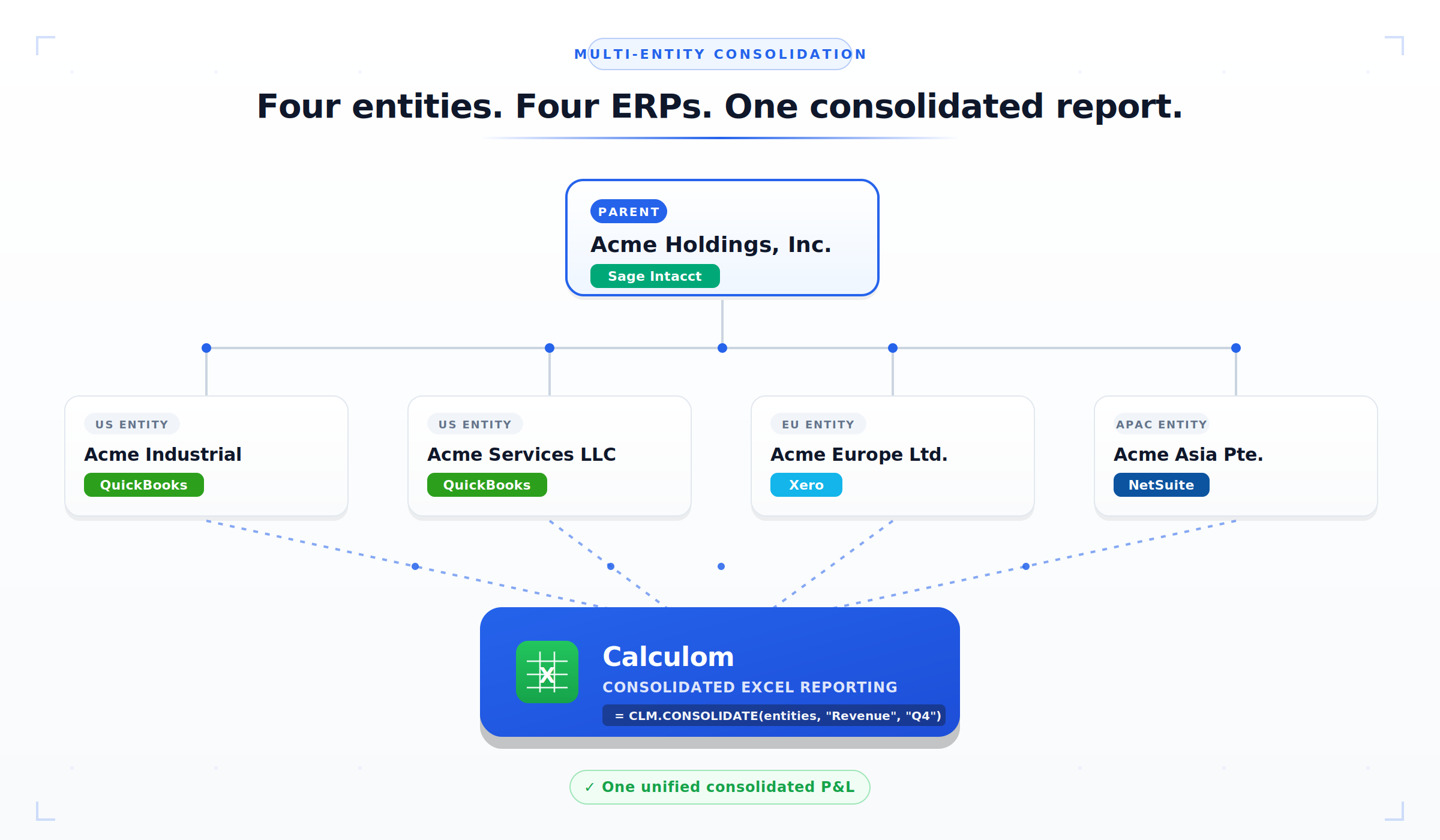
Pull from multiple ERPs in a single worksheet. Consolidate across entities and systems. Standardize reporting templates across your organization, even if every entity is on a different platform. Your board package, your variance analysis, your monthly close, all from the same spreadsheet, drawing from every system you operate.
The same Excel report can consolidate data from QuickBooks, NetSuite, and Xero. No manual exports, no copy-paste, no reconciliation headaches. Refresh the spreadsheet, get up-to-date numbers from every source.
Real-World Scenarios: Multi-ERP in Action
Three scenarios that come up constantly in conversations with our customers, and how multi-ERP Calculom changes them.
The Acquisition Integration
The situation: Your parent company runs on NetSuite. You've just acquired a smaller business that operates on QuickBooks. Leadership wants consolidated financials starting next month. ERP integration is on the roadmap, in about eighteen months.
The ERP Migration
The situation: You're twelve months into a Xero-to-Sage-Intacct migration. Some entities are already cut over. Others are still on the old system. You need accurate, timely reporting from both during the transition.
The Multi-Entity Structure
The situation: Parent on Sage Intacct. US operating subsidiaries on QuickBooks. European subsidiary on Xero (local compliance). Asian subsidiary on NetSuite. Four entities, four different ERPs, one consolidated P&L required every month.
The Before/After at a Glance
| Aspect | Before Calculom | With Calculom |
|---|---|---|
| Tools needed | 4–6 different reporting products | 1 unified platform |
| Team training | Multiple learning curves, fragmented expertise | Single interface, skills that transfer |
| Consolidation | Manual exports, error-prone reconciliation | Direct from all sources, live refresh |
| Monthly close | 3–4 weeks of stitched-together work | 1–2 weeks with automated refresh |
| ERP migration impact | Reporting rebuild required | Change the data source, keep the reports |
See it on your own data
Start a free trial, or book a demo with one of our finance specialists.
What This Means for EBM (Enterprise Budget Management)
A quick note for customers who've been following our EBM (Enterprise Budget Management) launch, and for anyone wondering how budgeting fits into this multi-ERP picture.
EBM is our sister product. It brings enterprise-grade budgeting and planning workflows to the same Excel environment Calculom reporting lives in. Think approval workflows, version control, consolidated budgets rolling up across entities, and planning templates that don't require a dedicated FP&A platform.
Here's how EBM's ERP coverage compares to Calculom reporting today:
- Calculom (reporting): All six ERPs (Odoo, Acumatica, QuickBooks, Sage Intacct, Xero, and NetSuite).
- EBM (budgeting): Odoo today, with Acumatica support landing soon. Additional ERPs are on the roadmap.
We're being explicit about this gap because we want to be honest about scope. Reporting and budgeting have different integration surfaces. Budgeting workflows require deeper write-back and approval integration than read-only reporting does. EBM's multi-ERP expansion is a direct follow-on to what we're announcing today, and it will unfold over the coming quarters, shaped heavily by which ERPs our customers prioritize.
If you're already using Calculom for reporting and want budgeting workflows on top, ask us about EBM. And if your ERP isn't yet on the EBM roadmap, let us know. Customer demand drives our priorities.
Getting Started
How you engage with multi-ERP Calculom depends on where you're starting from. Three clear paths:
Already using Calculom for Odoo?
Your existing subscription is the starting point. Connecting an additional ERP is a straightforward configuration step. Reach out and we'll walk you through it.
Connect your next ERP →New to Calculom?
Start a free trial with the ERP of your choice. Setup takes less time than you'd expect, and the Excel interface is instantly familiar to anyone on your finance team.
Start Free Trial →Using a different ERP?
We're continuously expanding support, and customer demand drives the roadmap. Tell us what you're on and let's talk about what's next.
Request Your ERP →One platform. Six ERPs. Zero ERP-specific reporting tools.
Whether you're consolidating across entities, migrating between systems, or simply tired of juggling multiple reporting tools, Calculom now meets you where you are, across six of the most popular ERPs in the world.
Get Started with Calculom Today →